Idea In 30 Seconds
Testing AI agents is different from classic software testing, because agent behavior depends not only on code, but also on LLM, context, tools, and step sequence.
That is why production systems usually use a multi-layer testing strategy: unit tests, evaluation datasets, regression comparisons against baseline, and replay of real traces.
This approach helps catch errors before release and control system degradation over time.
Problem
Classic testing approaches work poorly for AI agents. In regular software, the same input almost always produces the same output. In systems with LLM, behavior can change depending on:
- prompt wording;
- model version;
- context;
- tool outputs.
Because of this, local tests can pass, but in production the agent may:
- take extra steps and inflate token cost;
- pick the wrong tool in a complex scenario;
- become unstable after a model or prompt version change.
Without a structured testing strategy, these issues are usually found only after release.
Core Concept / Model
Agent testing strategy is built as multiple validation layers, not one test type. Each layer catches its own risk class in system behavior.
| Method | What it validates | When to use |
|---|---|---|
| Unit testing | Local agent logic: tool selection, output schema, basic runtime rules | On every code, prompt, or policy-rule change |
| Golden datasets | Stable case set for reproducible eval runs | When you need comparable results between baseline and candidate |
| Eval harness | System behavior in a standardized eval pipeline | Before release and for release validation |
| Regression testing | Differences (diff) between versions on the same evaluation and replay cases | After changing model, prompt, tools, or policy |
| Replay & debugging | Production incidents and failure traces for failure analysis | When you need to reproduce an incident and find the degradation cause |
The higher the validation layer, the more expensive the run, so it is usually executed less often.
How It Works
In production agent systems, testing is usually organized as a release pipeline: changes in code, prompts, model version, or tools go through unit tests, evaluation datasets, regression comparison with baseline, and replay of real scenarios.
How a change moves through the pipeline
- Change — any change in code, prompt, model version, or tools triggers a new run.
- Unit — local logic is validated: tool selection, result handling, basic runtime rules.
- Eval — agent runs on evaluation scenarios, and quality is measured by metrics such as
tool correctnessandtask completion. - Regression — candidate results are compared with baseline to detect unwanted behavior shifts.
- Gate — CI blocks release if key metrics drop or critical scenarios break.
- Replay — replay is used both before release (saved traces in staging) and after release (monitoring degradation).
Test Pyramid For Agents
Many teams organize agent testing as a pyramid:
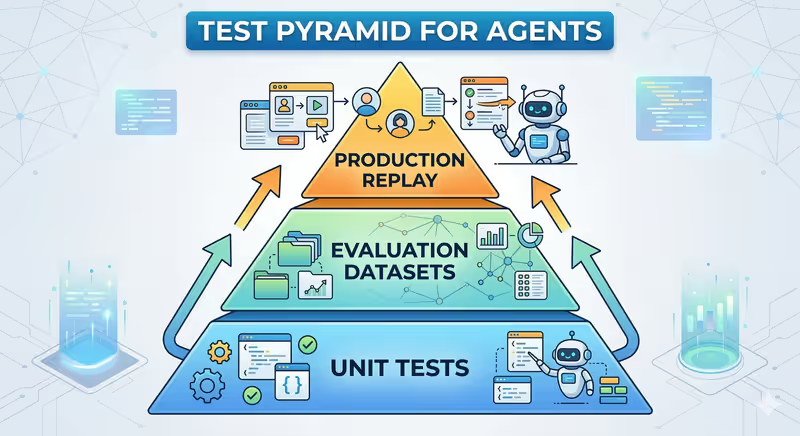
Regression here is not a separate layer, but a comparison method between new version and baseline on the same evaluation and replay tests.
- Unit tests — fast and cheap, executed frequently.
- Evaluation — slower, but validates agent behavior.
- Replay — most expensive, but covers real production scenarios.
Implementation
In practice, this usually looks like several automated checks in a pipeline. The examples below are schematic: they show validation logic and are not tied to one specific framework API.
1. Unit Test For Agent Logic
Validate that the agent chooses the correct tool.
def test_tool_selection():
    tools = FakeTools(price_api_response={"symbol": "BTC", "price": 65000})
    agent = Agent(tools=tools)
    result = agent.run("What is the price of BTC?")
    assert result.selected_tool == "crypto_price_api"
    assert result.output["symbol"] == "BTC"
In real unit tests, external tool calls are usually stubbed/mocked to validate agent logic, not network dependencies.
2. Evaluation On Scenario Dataset
Agent is executed on a suite of test requests.
test_cases = [
    {"input": "Find BTC price", "expected_tool": "crypto_price_api"},
    {"input": "Search latest AI news", "expected_tool": "web_search"}
]

for case in test_cases:
    result = agent.run(case["input"])
    assert result.tool == case["expected_tool"]
Evaluation quality is measured using quality, stability, and cost metrics (full list in Agent Testing Metrics below). For open or complex tasks, results are often additionally verified with LLM-as-a-judge. In production, evaluation also tracks token cost, latency, and agent step count, so new versions do not become more expensive, slower, or overly multi-step.
The evaluation dataset itself should also be versioned, otherwise over time it becomes unclear whether agent behavior changed or the scenario set changed.
3. Regression Test After Changes
When model or prompt changes, the same evaluation suite is run.
run_eval_suite(model="baseline-model")
run_eval_suite(model="candidate-model")
If results differ significantly, the change must be reviewed before release.
In practice, candidate is also compared with baseline on replay datasets, not only synthetic evaluation cases.
4. Replay Production Scenarios
Production requests are saved and used both before release (staging replay) and after release (post-release replay). Many teams automatically store failure traces and add them to regression dataset.
for trace in production_traces:
    result = agent.run(trace.input)
    evaluate(result, trace.expected_behavior)
This approach validates agent behavior on real scenarios, not only synthetic tests.
5. What Usually Blocks Release In CI
In practice, agent tests are often split into deterministic checks (local logic, routing, output format) and non-deterministic checks (answer quality, completeness, reasoning adequacy), where eval metrics or LLM-as-a-judge are used.
CI usually blocks release when critical scenarios fail, task success rate drops, hallucination rate rises, or latency and token cost increase sharply.
Typical Mistakes
Testing Only Prompts
Team checks several manual examples and considers change safe, but this does not cover agent behavior in real execution loop.
Typical cause: no systematic evaluation process with clear metrics.
In production this often turns into AI agent drift after release.
No Evaluation Scenario Datasets
Without a control scenario set it is hard to compare baseline and candidate objectively.
Typical cause: no golden datasets were built.
Result: answer quality becomes unstable, regressions are found late.
No Regression Validation
After model or prompt changes, system can formally "work" but produce a different behavior profile.
Typical cause: no regular regression testing runs.
In production this usually appears as initially subtle AI agent drift.
No Model Version Pinning
LLM providers sometimes update models without changing generic model name.
If version is not pinned (for example, gpt-4o-2024-08-06), tests may pass today and start failing tomorrow.
Typical cause: config uses a "floating" model name without pinning.
Production systems usually pin a specific model version or snapshot version.
No Replay Tests
A production incident happens once, but team cannot reliably reproduce it locally.
Typical cause: failure traces are not saved and agent replay and debugging is not used.
Result: the same bug returns after later releases.
Testing Only Happy-Path Scenarios
Evaluation datasets contain only "clean" requests, while real requests are often incomplete, ambiguous, or come during partial dependency failures.
Typical cause: no scenarios with tool errors and dependency degradation.
In production this often appears as tool failure or partial outage.
Agent Testing Metrics
| Metric | What it shows |
|---|---|
| Tool accuracy | correctness of tool selection |
| Task success rate | task completion |
| Hallucination rate | frequency of incorrect facts |
| Token cost | execution cost |
| Latency | task execution time |
| Reasoning steps | number of agent steps |
Approach Limitations
Multi-layer testing does not fully remove non-determinism, because LLM systems are not fully deterministic. It only reduces risk and makes behavior shifts visible earlier.
Evaluation and replay are also costly: they increase run time, CI load, and model cost.
That is why real teams often split full validation into fast pre-merge tests and heavier nightly or pre-release runs.
Summary
- One test type is not enough for AI agents.
- Unit tests validate local logic.
- Evaluation and regression control behavior quality after changes.
- Replay helps reproduce real production failures.
FAQ
Q: Are unit tests alone enough for agents?
A: No. Unit tests catch local bugs well, but behavioral risks are covered by evaluation, regression, and replay.
Q: What is evaluation for agents?
A: It is running agent on a scenario dataset and scoring outputs with key quality, stability, and cost metrics.
Q: When should regression tests run?
A: After any change that can affect agent behavior: model update, prompt change, new tools, or runtime-logic update.
Q: Why use replay of production traces?
A: Replay reproduces real production requests and checks whether system behaves the same after changes. It helps catch failures that are hard to reproduce with synthetic tests.
What Next
If you want to assemble this strategy into a working pipeline, start with Unit Testing, then add Golden Datasets, and standardize run execution and scoring through Eval Harness. This sequence gives fast feedback in development and stable quality checks in CI.
When updating model, prompts, or tools, Regression Testing becomes critical. And if the issue already happened in production, Replay and Debugging usually works best: reproduce real trace and verify where agent behavior changed.
For multi-agent systems with Orchestrator Agent, add dedicated tests for step order, branch dependencies, and partial failures. In these scenarios, classic production risks appear most often: Infinite Loop, Tool Spam, and Cascading Failures.