When we say an agent can "use a tool," it sounds like it clicks a button or runs a program.
But inside, it works differently. The agent cannot open a file, send an email, or call an API by itself.
It works with text only.
So how does an agent interact with the real world?
How can a text model:
- Get data from a database
- Send a request to a server
- Write a result to a file
The answer is tool calling.
The model does not execute actions itself. It asks the system to do them.
It decides when a tool is needed.
And the surrounding system executes it.
What a tool really is
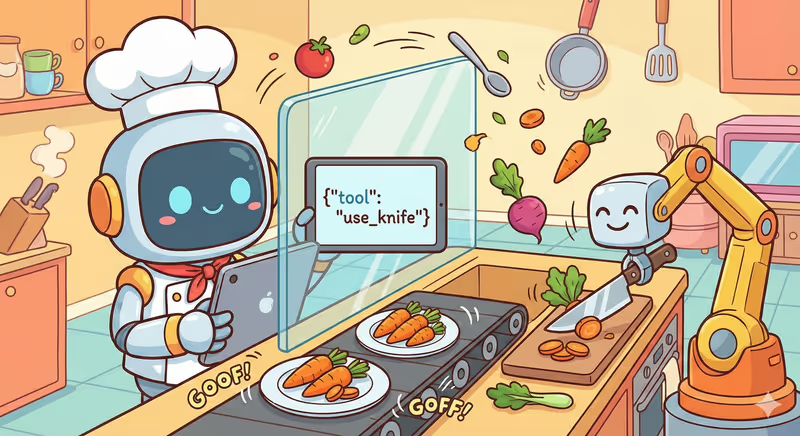
A tool is an action the agent can ask to be executed.
It can be:
- Get data from an API
- Find information in a database
- Read a file
- Send a message
- Write a result
For the model, this looks like another response option.
Instead of writing text, it can say:
"To move forward, I need this action to be executed."
And specify:
- Which tool to use
- With which parameters
For example:
{
  "tool": "get_user_data",
  "parameters": {
    "user_id": 123
  }
}
At this point, the model does not execute the action itself. It only proposes it.
If the system allows the action, it executes the tool and returns the result (Data, Status, or Error) back to the model.
After that, the agent decides what to do next.
How the model knows which tools exist
The model does not search for tools by itself.
It is told in advance which actions are available.
Before work starts, the system sends the model a list of tools it can use.
Each tool has:
- Name - what it is called
- Description - what it does
- Parameters - what data it needs
For example:
{
  "name": "get_user_data",
  "description": "Gets user information by ID",
  "parameters": {
    "user_id": "number"
  }
}
For the model, this is a set of possible actions it can choose at the right moment.
It does not invent new tools.
It chooses from the ones it is allowed to use.
That is why an agent cannot call just any API.
Only the ones it was given.
How the agent chooses a tool
At any moment, the agent can have several possible actions.
It can:
- Write a response
- Use a tool
- Or finish the task
To choose, it looks at:
- The current goal
- The available data
- The result of previous steps
And asks a simple question:
"What will move me toward the result right now?"
If the response is not enough, it may need to call a tool and get new data.
If data is already enough, it can continue without it.
If the task is done, it can finish.
This is not a rigid script.
It is a choice the agent makes in each loop.
That is why it can use different tools depending on the situation, not in a fixed predefined order.
What happens after a tool call
When the agent chooses a tool and asks to execute it, the surrounding system takes over.
It:
- Checks whether this tool is allowed
- Executes the action
- Gets the result
This can be:
- Data from an API
- File contents
- Execution status
- Or an error
After that, the result is returned to the model as text.
For the agent, this looks like new information it can use.
It analyzes the result:
- Did it get the required data?
- Did it get closer to the goal?
- Does it need one more step?
And based on that, it decides to:
- Use another tool
- Continue without a tool
- Or finish the task
That is how each tool call becomes part of the action loop.
In code this looks like
Imagine the agent wants to get user data. It cannot call a function by itself. It can only ask the system to do it in the form of a text request:
# Model decides:
# "To move forward, I need user data"

model_output = {
    "tool": "get_user_data",
    "parameters": {
        "user_id": 123
    }
}
The model does not execute anything. It only says: "Please execute this tool."
Now this request is received by the system around the agent:
def get_user_data(user_id: int):
    return {"id": user_id, "name": "Anna"}


TOOLS = {
    "get_user_data": get_user_data
}
The system checks:
- whether such a tool exists
- whether it is allowed to use it
And only after that executes:
tool_name = model_output["tool"]
params = model_output["parameters"]

result = TOOLS[tool_name](**params)
After that, the result is returned to the model as text:
tool_result = f"User data: {result}"
And now the agent can decide to:
- use this data
- call another tool
- or finish the task
In this example, we created model_output manually.
In a real agent, it is generated by the language model itself. It analyzes the task, decides that a tool is needed, and forms the same request automatically.
Full implementation example with connected LLM
Real-life analogy
Imagine you are cooking dinner.
You have:
- a fridge
- a stove
- a knife
- a microwave
These are all the tools you can use.
You cannot:
- use an oven if there is none
- or take a blender if it is not in the kitchen
Now you want to cook soup.
You think:
What helps me right now?
You can:
- open the fridge
- turn on the stove
- or take a knife
You choose one tool, use it, and check what changed.
Then choose the next one.
And continue until the dish is ready.
The same happens with an agent.
It gets a list of available tools.
It cannot invent new ones, only choose from existing ones.
At each step it decides:
which tool helps move toward the result
It uses it and moves forward.
In short
Tool calling is how an agent interacts with the real world.
The model does not execute actions itself. It asks the system to execute them on its behalf.
The system gives it the list of available tools. The model chooses the right one at the right moment. The system checks permission, executes the action, and returns the result.
And based on that, the agent decides what to do next.
FAQ
Q: Does the agent execute actions on its own?
A: No. The model does not execute actions itself. It only asks the system to execute a tool on its behalf.
Q: What is tool calling?
A: It is a way for the model to ask for an action, for example getting data or writing a result, so it can move toward the goal.
Q: How does the agent know which tools it can use?
A: Before work starts, the system provides the model with a list of available tools it can choose from at each step.
What is next
Now you understand the basics of tool calling.
But in real work, harder questions appear:
How do you control which tools the agent can use?
What do you do if one tool is expensive and another is risky?
How do you give an agent data access but forbid deletion?
This is no longer basics.
This is production reality.